How to buy on Hyperliquid from scratch
Last reviewed: August 2026
In one line
You buy USDC on an exchange, withdraw it to the Arbitrum network, deposit it into Hyperliquid from your own wallet, and only then do you trade. The hard part isn't trading: it's getting there.
The short version, if you already know what you're doing
- Buy USDC on Coinbase (no buying fee) or USDT on Binance (small fee). If you bought USDT, convert it to USDC before withdrawing: the Hyperliquid bridge takes USDC.
- Also buy about $5 of ETH. It's not for trading: it's Arbitrum gas.
- Withdraw both over the Arbitrum network, to your own self-custody wallet (Trust Wallet, MetaMask, Rabby).
- Open app.hyperliquid.xyz from your wallet, connect, and hit Deposit.
If any of those four lines wasn't obvious, the rest of this page is exactly that, explained slowly, with the traps at each step.
This guide uses Coinbase as the example exchange because it's one of the most common, but it works the same from any exchange where you can buy USDC and withdraw it over Arbitrum. If you're in Latin America, only the first leg changes —Crypto in Latin America— and from step 3 onward it's identical. What does change everything is the country you connect from: from the United States, today, Hyperliquid does not allow deposits or withdrawals. It's explained a little further down; read it before buying anything.
Already started and something doesn't add up? → If something went wrong
The full path
- Your bankYou move dollars into CoinbaseA company holds itWhere people get stuck: On a new account the money arrives fast but takes days before it can leave to an address of your own.
- CoinbaseYou buy USDC and withdraw it to ArbitrumA company holds itWhere people get stuck: Picking the wrong blockchain on that withdrawal is the most expensive mistake on this route.
- Your walletUSDC on Arbitrum, at an address only you controlYou hold itWhere people get stuck: With no ETH for gas you cannot move anything: the USDC just sits there.
- HyperliquidYou deposit and tradeYou hold itWhere people get stuck: There is a minimum deposit. Below it, the money is not credited.
- 1You move dollars into Coinbase. Where people get stuck: On a new account the money arrives fast but takes days before it can leave to an address of your own.
- 2You buy USDC and withdraw it to Arbitrum. Where people get stuck: Picking the wrong blockchain on that withdrawal is the most expensive mistake on this route.
- 3USDC on Arbitrum, at an address only you control. Where people get stuck: With no ETH for gas you cannot move anything: the USDC just sits there.
- 4You deposit and trade. Where people get stuck: There is a minimum deposit. Below it, the money is not credited.
Four stops, and at each one who's holding your money changes. That's the part that matters: at the first two there's a company you can complain to if something goes wrong. At the last two there's nobody.
Can you use Hyperliquid from your country?
Worth settling before you buy anything. Hyperliquid doesn't ask you for KYC —you connect your wallet and that's it— but its terms of use do say which countries can use the site, and that list changes.
From the United States, today, the site opens blocked
If you open app.hyperliquid.xyz from a US connection, a red band appears at the top saying you are accessing from a restricted jurisdiction, and the trading panel says "Deposits and withdrawals are not allowed." You can watch prices, but you cannot deposit or withdraw.
In practice, people trading from the United States do it with a VPN. That is information, not a recommendation.
This isn't specific to Hyperliquid: it happens with exchanges, with cards, and with almost any crypto product, and the way to check is always the same.
→ When a site doesn't serve your country · What a VPN does and doesn't do
What you need before you start
| What | What for | How long it takes |
|---|---|---|
| A wallet that supports Arbitrum | It's your account on Hyperliquid: no username, no password | Minutes |
| An account at an exchange where you can buy USDC | It's the only point on this route that connects to your bank | KYC: minutes to days |
| Pen and paper | To write your wallet's words down by hand | A minute, and it has no undo |
| A few days of slack | A new account won't let you withdraw until the bank settles | Days |
How much is worth moving
The round trip has a flat cost —a fee on the deposit and another on the withdrawal, plus gas— that does not depend on the amount. Below roughly $50 you're paying a high percentage just to move. That's fine for testing the circuit; for actually trading, make the amount justify it.
Step 1: pick a wallet that supports Arbitrum
Hyperliquid has no accounts and no passwords. You connect with a self-custody wallet: an app that holds your private key.
Where are you doing this?
| Recommended wallet | How you get into Hyperliquid | |
|---|---|---|
| Computer | MetaMask or Rabby (browser extension) | Open the page normally and hit Connect |
| Phone | Trust Wallet or Coinbase Wallet | From the browser built into the wallet app, not from Safari or Chrome |
On a phone, "Connect" from Safari or Chrome won't find your wallet
It isn't broken: that's how it works. Open your wallet app, find its built-in browser (usually labelled Browser, dApps or Discover) and type app.hyperliquid.xyz there. From that browser it connects.
Nothing happens, or it asks you to install a wallet you already have
The wallet is already there: it asks you to approve and that is it
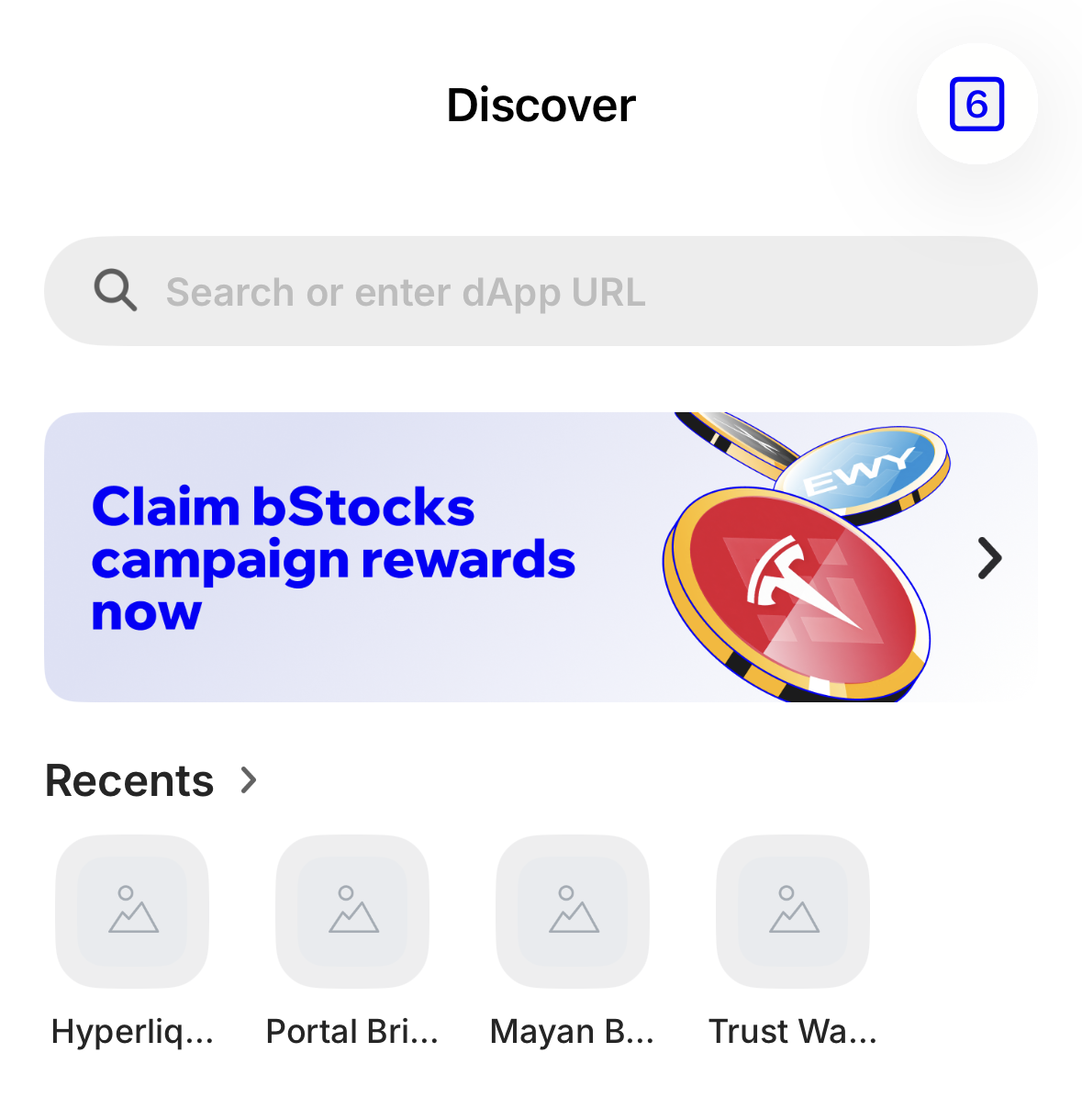
- Type app.hyperliquid.xyz here — this bar is the wallet's browser
This guide didn't make that up
When you hit Connect, Hyperliquid spells it out: "To use a different defi wallet, visit app.hyperliquid.xyz from your wallet app's native browser."
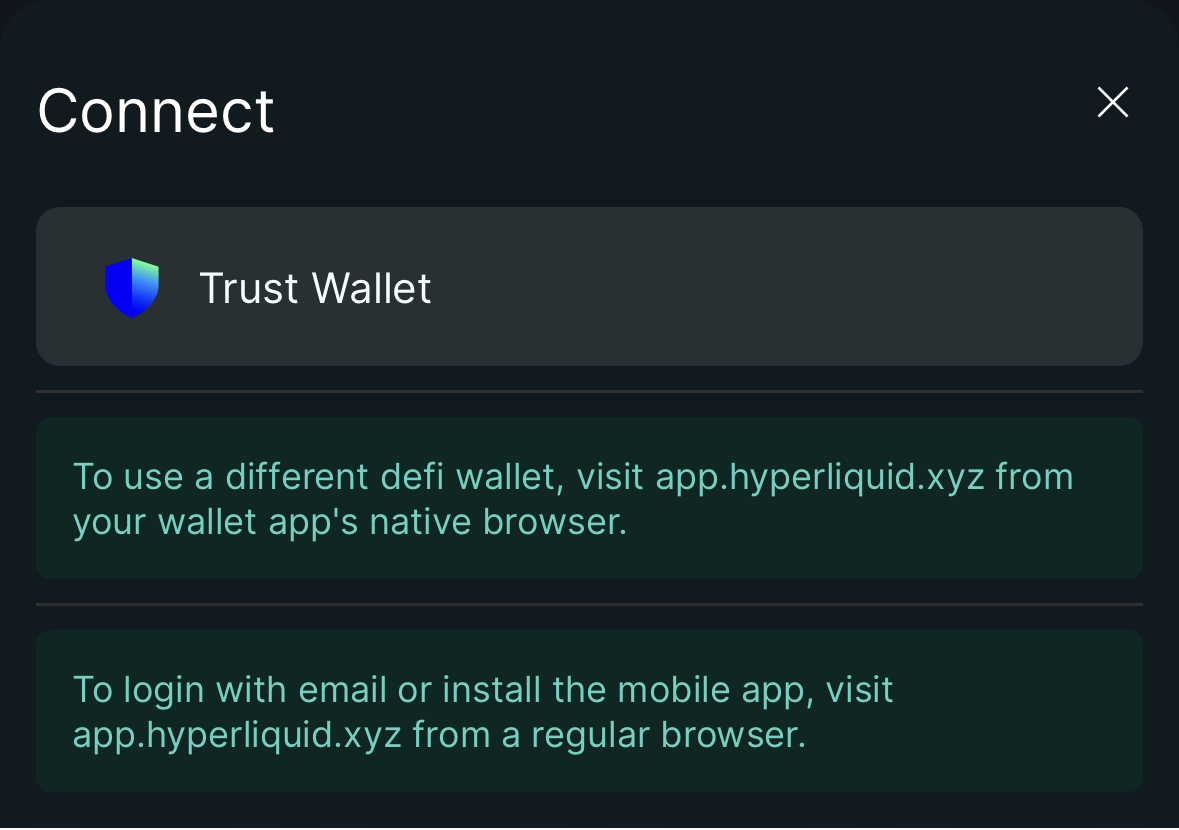
- Your wallet shows up on its own, because you are inside its browser
The deposit comes in over the Arbitrum blockchain, so your wallet needs to support it. Not all of them do.
MetaMask, Rabby, Trust Wallet, Coinbase Wallet. All four support Arbitrum and connect to Hyperliquid.
Phantom. Its own documentation lists Arbitrum among the unsupported networks (check it here).
The confusing part: it will show you something called "Hyperliquid" and still not be able to make the deposit. → Why
If you already sent USDC to Arbitrum from Phantom
It isn't lost. The address is the same on every EVM network: import your seed phrase into MetaMask or Rabby, switch to the Arbitrum network, and there it is. → Why this happens
If you've never created one, start with Create your wallet.
Your keys: this has no undo
When you create the wallet you'll be shown 12 or 24 words. That's called a seed phrase, and it is the key to your wallet — not a backup password.
The difference matters. The app (Trust Wallet, MetaMask) is just the keyring: you can delete it, switch phones or switch apps, and nothing happens. The words are the actual key. That's why those same 12 words open your money from any other app, and why anyone who has them needs nothing else.
- Anyone who has them can drain you, with no password and no 2FA
- If you lose them, there's no support, no recovery, and no judge who can help
- Nobody legitimate will ever ask you for them — not even "Hyperliquid support"
Write them by hand on paper, in two separate places, before you send the first dollar. Don't photograph them, don't put them in your phone's notes, don't send them over WhatsApp.
→ How to back them up properly · What scams look like
Step 2: buy USDC — and a little ETH
USDC is a token worth one dollar. It's what Hyperliquid uses as its base currency: you don't deposit dollars, you deposit USDC.
The worked example from here on is Coinbase
- You open an account and pass KYCID and a selfie; it is a regulated exchange
- You move dollars in from your bankby ACH it is usually free
- You buy USDCthis is what you are going to trade
- You also buy a few dollars of ETHthis is not for trading: it is to pay for transactions
The wait that catches everyone out
On a new account, money that comes in by ACH can be traded right away but not withdrawn to an address of your own until the bank settles the transfer. It's usually a matter of days, and Coinbase doesn't promise a fixed number.
It's not an error and it's not a scam. Just start this process a few days before you want to trade.
Outside the United States, the equivalent step is in Buying for the first time and Crypto in Latin America.
Why you also need ETH
This is the step that trips up almost everyone, and it gets solved here or it doesn't get solved.
What "gas" is
Gas is what a transaction costs. Every time you move something on a blockchain, thousands of computers process it, and that fee is the gas.
Like a stamp on a letter: it doesn't matter what you wrote inside, without the stamp it doesn't go.
Every blockchain charges gas in its own coin. On Arbitrum and Ethereum you pay in ETH. On Solana, in SOL. → Gas: why it costs
If you withdraw only USDC, you'll open your wallet and won't be able to do anything. It's not that the USDC is wrong: it's that you have USDC and zero ETH, and ETH is what pays the gas on Arbitrum. Your money just sits there looking at you.
Arbitrum is cheap: a transfer costs cents or less. A few dollars of ETH covers an enormous number of transactions.
If you buy the ETH afterwards, it may be too late
Going back to the exchange for ETH means waiting through the bank settlement all over again if your account is new. Buy it now, on the same trip as the USDC.
Step 3: move it off the exchange into your wallet
This is the most expensive mistake in the whole route. When you withdraw, the exchange asks you which network to send on.
"Network" and "blockchain" are the same thing
Arbitrum, Ethereum, Solana and Base are different blockchains: separate ledgers that don't talk to each other. On screen they're almost always called "networks," which is why you'll see both words in this guide.
What to remember: USDC on one blockchain does not work on another, even though it has the same name.
USDC exists on many of them and they are not interchangeable.
Your address: 0x834fC75B…bB10
Choose Arbitrum, for the USDC and for the ETH. If you choose Ethereum, the USDC still arrives but on the wrong blockchain, and moving it from there costs a lot more. If you choose one your wallet doesn't support, you won't see it at all.
→ How to pick the right network · Common mistakes
How to paste your address without getting it wrong
In your wallet, switch to the Arbitrum blockchain and copy your address. It starts with 0x.
After pasting it into the exchange, compare the first 4 and the last 4 characters against what your wallet says. Never type it by hand.
Why that comparison isn't paranoia
There is malware that watches the clipboard and replaces the address you copied with the attacker's. At a glance it looks identical. Comparing the start and the end is the only thing that catches it, and the transaction cannot be reversed. → Verifying addresses
Send a $2 test first
The golden rule: before the real amount, send a small test. If the address or the blockchain is wrong, you lose two dollars instead of two thousand.
Wait for it to arrive, confirm it, and only then send the rest.
Careful: in the next step this rule flips
From the exchange to your wallet, the smaller the test the better. From your wallet to Hyperliquid, no. There's a minimum there below which the money is lost. → The bridge minimum
How to know it arrived
Look up your address on the Arbitrum explorer: arbiscan.io. Both transactions should show up, the USDC one and the ETH one.
If Arbiscan shows them but your wallet doesn't, the problem is the wallet: check that it's set to Arbitrum and not another blockchain. The funds are fine.
USDC is not the same as USDC.e
On Arbitrum there are two: native USDC and an older bridged version called USDC.e. The Hyperliquid bridge wants the native one.
If you withdrew from an exchange choosing Arbitrum, it's the right one. If your wallet says USDC.e, that one won't work for the deposit.
Step 4: deposit into Hyperliquid
Go to app.hyperliquid.xyz.
Check the URL, every time
Fake exchange sites live off you mistyping the address or clicking an ad. Go there carefully once, bookmark it, and from then on use the bookmark. → Scams
The first thing you'll see is perps
The screen that loads by default is perpetuals, not the buy screen. Don't touch anything yet: in this step you're only connecting and depositing. → Spot vs perps
- Connectyou pick your wallet and approve the connection
- You sign a message to enable tradingit moves no money and costs no gas
- Depositamount in USDC, from Arbitrum
- You confirm the transaction in your walletthis is where the ETH gas gets spent
- Your balance shows upusually a couple of minutes
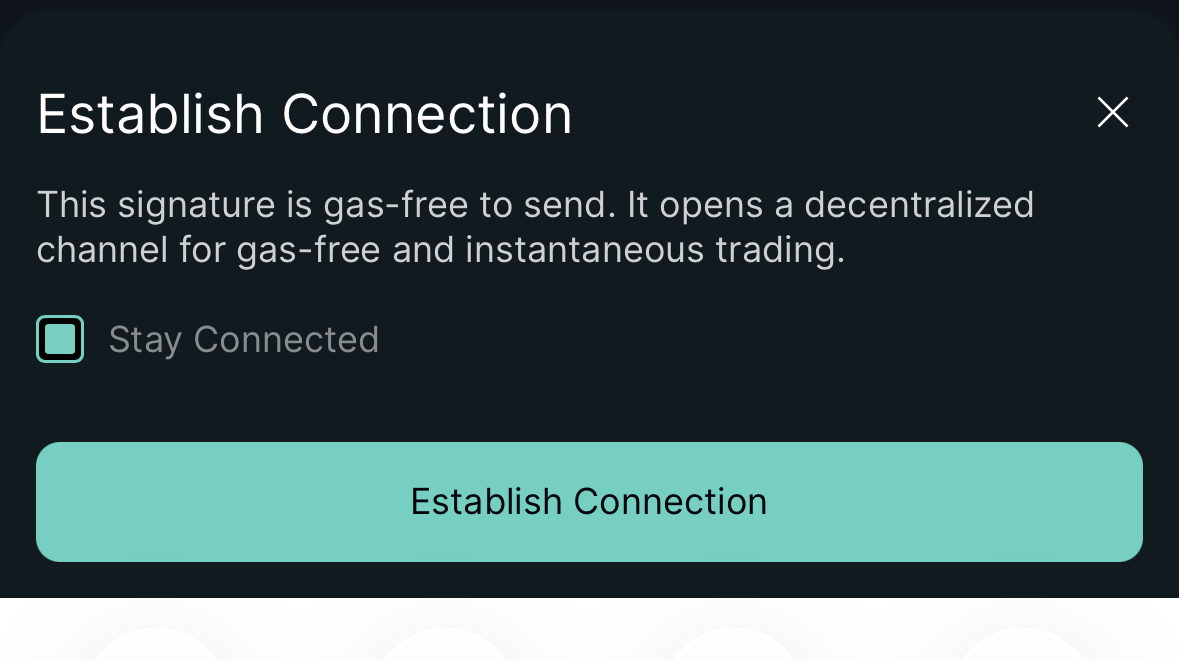
- This signature moves no money and costs no gas: the screen says so
Connecting isn't signing, and signing a message isn't approving a contract
Connecting your wallet only shares your public address. Signing a message doesn't move funds either. What does move funds is approving a contract, and that's where most thefts happen.
Learn to tell them apart before you sign anything anywhere: → Before you sign
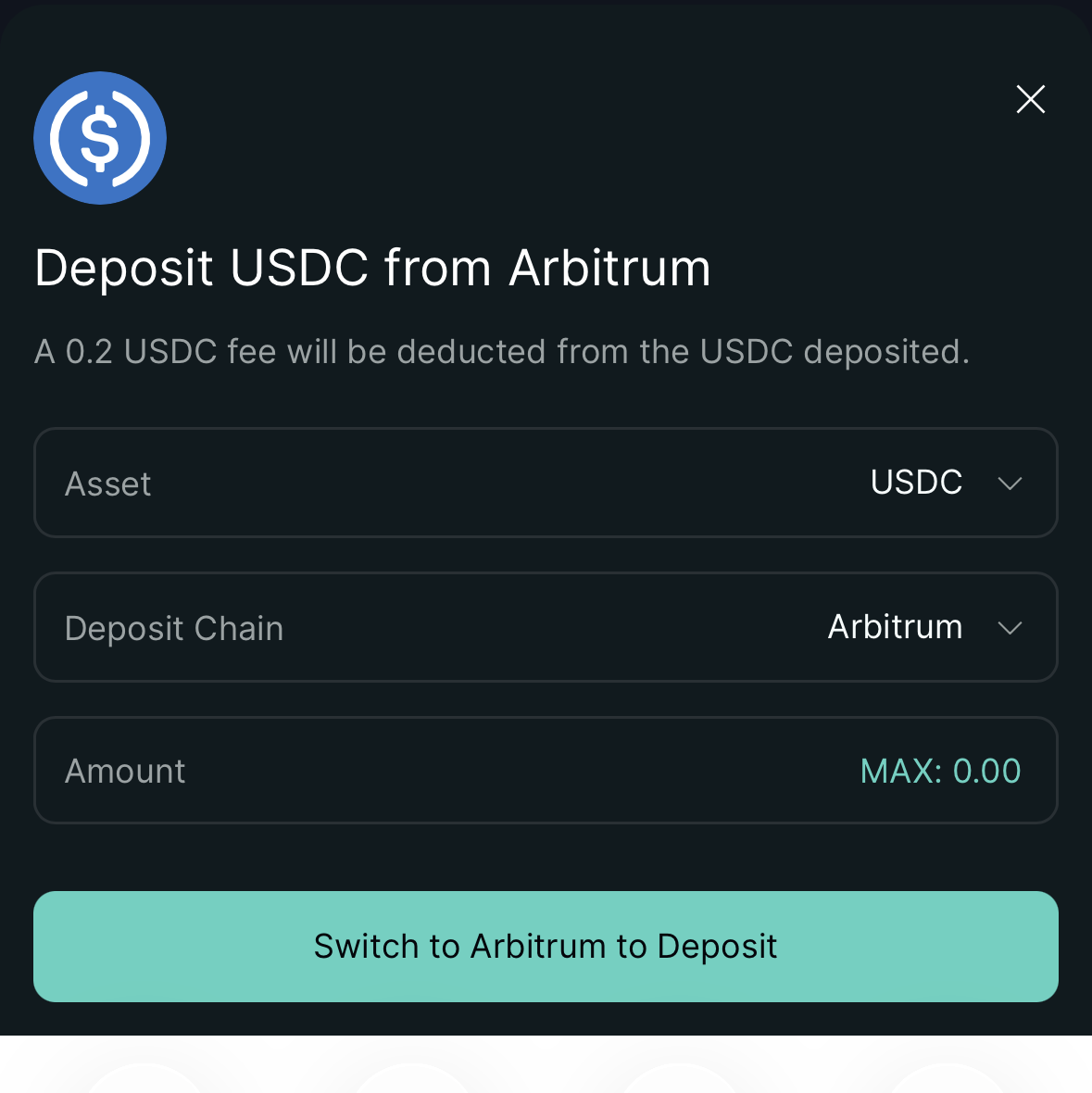
- Deposit fee: it comes out of what you send
- Asset: USDC
- Deposit Chain: Arbitrum
- If your wallet is on another blockchain, the button switches it before letting you deposit
The bridge minimum: don't test with $1 here
The Hyperliquid bridge has a minimum deposit, and anything you send below it is not credited and is not recoverable. At the time of writing it's 5 USDC.
Your test deposit has to be comfortably above the minimum. Send 10 or 20, not 1.
Check the minimum before you send the first one
It's a number that can change. It's in the official Hyperliquid documentation. Look it up yourself, today, instead of trusting this page.
Deposit from your wallet, not from the exchange
The bridge credits the deposit to the address that sent it. If you send USDC straight from Coinbase to the bridge, the sending address is Coinbase's, not yours.
The path is always: exchange → your wallet → Hyperliquid.
Your Hyperliquid account is your wallet
There is no username and no password: your address is the account. The balance is tied to it, and the withdrawal comes back to it.
Which means: if you lose the wallet, you also lose whatever is sitting in Hyperliquid. There is no "recover my account" that saves you. It's the same reason the keys step comes before everything else.
Step 5: your first purchase, on the Spot tab
Before you touch anything: look at the tab
Hyperliquid is famous for perpetuals, and the perps screen looks a great deal like the buy screen. On Spot you buy the token and it's yours. On Perps you bet on the price with borrowed money, and you can lose it all without the price ever reaching zero.
If you mean to buy, stay on Spot. → Spot vs perps, explained
Placing the order
With a balance, and the Spot tab selected:
- You pick the pairfor example BTC/USDC
- You check that it says Spot, not Perpit is the tab up top
- You pick the order typeMarket or Limit
- You enter the amount in USDCnot in token quantity, it is easier to follow
- Buyand confirm
| Order type | What it does | When to use it |
|---|---|---|
| Market | Buys now, at whatever the price is | You want in and that's it |
| Limit | Buys only if the price reaches yours | You can wait, you want to pay less |
For small amounts, Market is fine. For large ones, a Market order can fill worse than the price you saw on screen (that's called slippage); that's when Limit is worth it.
Fees here are low — and gas is zero
Trading inside Hyperliquid pays no gas. The base-tier trading fee is under a tenth of 1% per trade, and it drops with volume. That's an order of magnitude, not a promise: the current table is in the official documentation.
What does cost you is getting in and out: Arbitrum gas, plus a flat fee on the deposit and another on the withdrawal.
The "BTC" you buy here isn't Bitcoin
It's a token that represents a Bitcoin held somewhere else. For trading it makes no difference; for holding long-term, it does. → The full explanation
Step 6: cashing out
Just as important as getting in, and worth testing with a small amount before you actually need it.
- Send the USDC to your Coinbase account (Arbitrum network)
- Sell USDC for dollars
- Withdraw to your bank
Business days, not minutes. And this is the moment it shows up on your taxes.
- Load the USDC onto a crypto card
- Spend it like any Visa or Mastercard
Availability changes by country and changes often. Check with the issuer before counting on it.
The withdrawal from Hyperliquid to Arbitrum is signed on the site itself, takes a few minutes, and charges a flat fee (≈1 USDC, regardless of the amount). Which is why withdrawing $20 is proportionally expensive and withdrawing $2,000 is nearly free.
To your bank
It's the boring path and the one that works: USDC to your exchange account (Arbitrum network, again), sell for dollars, and transfer to your bank. Business days.
Note: selling is the taxable moment. Moving crypto between your own wallets usually isn't; selling is. → Crypto taxes
To a card
There are Visa and Mastercard cards you load with stablecoins, and they save you the selling step. The difference that matters is whether the company holds the balance or you hold it until the moment you spend — and availability by country changes often, so it has to be checked with the issuer.
→ Crypto cards, the two families
Review before you send the real amount
If something went wrong
| The symptom | What's happening | What to do |
|---|---|---|
| My wallet doesn't have Arbitrum | That wallet doesn't support the deposit's blockchain | Choosing the wallet |
| I have USDC but can't move anything | You have no ETH to pay for the transaction | Why you also need ETH |
| I withdrew from the exchange and it's not in my wallet | Almost always the wrong blockchain, or the wallet isn't showing it | How to know it arrived |
| I had USDC and it won't let me deposit it | It may be bridged USDC.e and not the native one | USDC vs USDC.e |
| I deposited into Hyperliquid and don't see the balance | The bridge minimum, or you're looking at the other pocket | The minimum · Spot vs perps |
| I sent less than the minimum | That money is not credited | The minimum |
| I meant to buy and opened a leveraged position | You were on the Perps tab | Spot vs perps |
| People keep mentioning HyperEVM and I don't know what it is | They're different layers with the same name | What is HyperEVM? |
| On my phone it won't connect the wallet | You're in Safari or Chrome, not in the wallet's browser | Connecting from a phone |
| I lost my wallet's words | There is no recovery | Your keys |
What if I don't want to go through Arbitrum?
Other routes exist —depositing BTC, ETH or SOL from their own blockchains, or third-party bridges— and how you get in is one of the things that changes most often on Hyperliquid.
For a first time, don't use them: every extra route adds a middleman that can fail. Once you've done the full trip a first time, look at what the deposit screen itself offers.
If you came looking for something else:What Hyperliquid is and wrapped BTC · What perpetuals are · Start from the beginning